

Introduction#
In C programming, format specifiers are used to inform the compiler about the type of data to be printed or read during input and output operations. These specifiers always begin with a
%symbol and are used in functions likeprintf(),scanf(), andsprintf().Each format specifier corresponds to a specific data type, such as
%dfor integers and%cfor characters. This guide will cover some of the most commonly used format specifiers and their practical applications.
List of Format Specifiers#
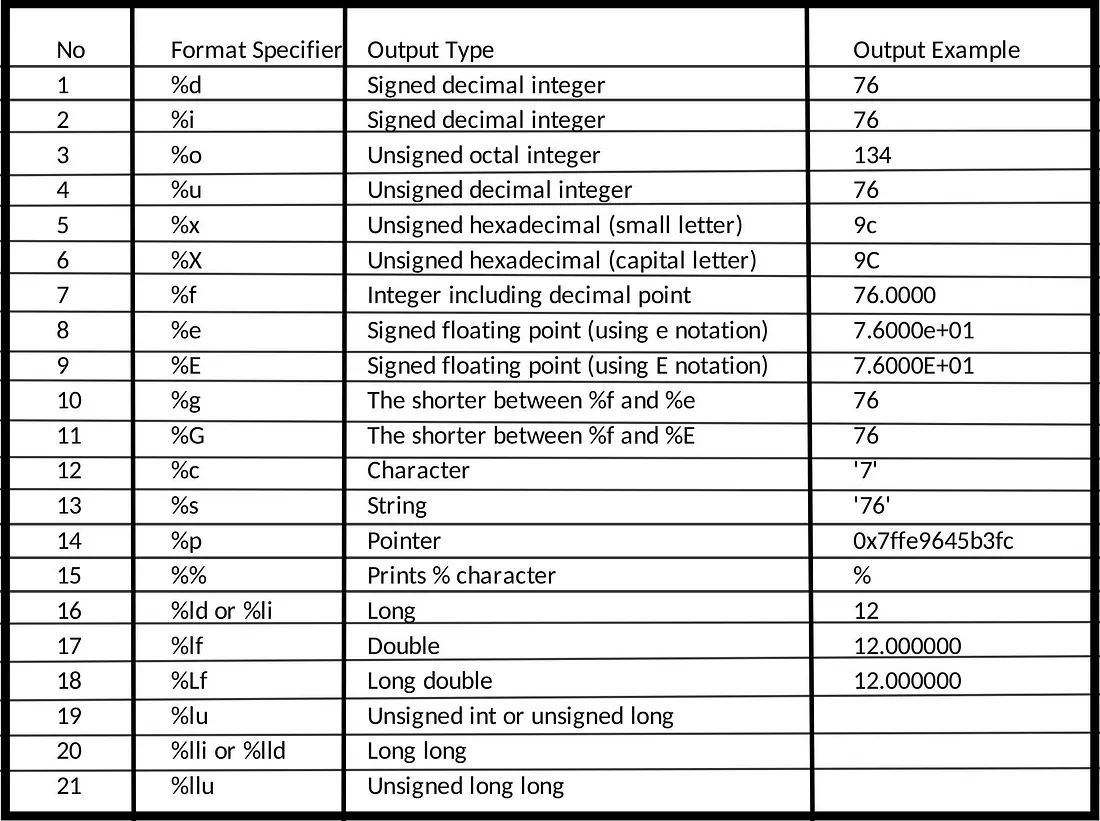
The below table contains the most commonly used format specifiers in C
Examples of Format Specifiers#
Character Format Specifier#
The %c is the format specifier for the char data type in C language. It can be used for both formatted input and formatted output in C language.
Syntax:
scanf("%c...", ...);
printf("%c...", ...);
Example:
// C Program to illustrate the %c format specifier.
#include <stdio.h>

int main()
{

    char c;
    // using %c for character input
    scanf("Enter some character: %c", &c);

    // using %c for character output
    printf("The entered character: %c", &c);
    return 0;
}
Input:
Enter some character: A
Output:
The entered character: A
Integer Format Specifier (signed)#
We can use the signed integer format specifier %d in the scanf() and print() functions or other functions that use formatted string for input and output of int data type.
Syntax:
scanf("%d...", ...);
printf("%i...", ...);
Example:
// C Program to demonstrate the use of %d and %i
#include <stdio.h>

// Driver code
int main()
{
    int x;
    // taking integer input
    scanf("Enter the two integers: %d", &x);

    // printing integer output
    printf("Printed using %%d: %d\n", x);
    printf("Printed using %%i: %3i\n", x);
    return 0;
}
Input:
Enter the integer: 21
Output:
Printed using %d: 21
Printed using %i:    21
Unsigned Integer Format Specifier#
The %u is the format specifier for the unsigned integer data type. If we specify a negative integer value to the %u, it converts the integer to its 2’s complement.
Syntax:
printf("%u...", ...);
scanf("%u...", ...);
Example:
// C Program to illustrate the how to use %u
#include <stdio.h>


int main()
{
    unsigned int var;

    scanf("Enter an integer: %u", &var);

    printf("Entered Unsigned Integer: %u", var);

    // trying to print negative value using %u
    printf("Printing -10 using %%u: %u\n", -10);
    return 0;
}
Input:
Enter an integer: 25
Output:
Entered unsigned integer: 25
Printing -10 using %u: 4294967286
Floating-point format specifier#
The %f is the floating point format specifier in C language that can be used inside the formatted string for input and output of float data type. Apart from %f, we can use %e or %E format specifiers to print the floating point value in the exponential form.
Syntax:
printf("%f...", ...);
scanf("%e...", ...);
printf("%E...", ...);
Example:
// C program to demonstrate the use of %f, %e  and %E
#include <stdio.h>

// driver code
int main()
{
    float a = 12.67;
    printf("Using %%f: %f\n", a);
    printf("Using %%e: %e\n", a);
    printf("Using %%E, %E", a);
    return 0;
}
Output:
Using %f: 12.670000
Using %e: 1.267000e+01
Using %E, 1.267000E+01
Unsigned Octal number for integer#
We can use the %o format specifier in the C program to print or take input for the unsigned octal integer number.
Syntax:
printf("%o...", ...);
scanf("%o...", ...);
Example:
#include <stdio.h>
int main()
{
    int a = 67;
    printf("%o\n", a);
    return 0;
}
Output:
103
Unsigned Hexadecimal for integer#
The %x format specifier is used in the formatted string for hexadecimal integers. In this case, the alphabets in the hexadecimal numbers will be in lowercase. For uppercase alphabet digits, we use %X instead.
Syntax:
printf("%x...", ...);
scanf("%X...", ...);
Example:
// C Program to demonstrate the use of %x and %X
#include <stdio.h>
int main()
{
    int a = 15454;
    printf("%x\n", a);
    printf("%X", a);
    return 0;
}
Output:
3c5e
3C5E
String Format Specifier#
The %s in C is used to print strings or take strings as input.
Syntax:
printf("%s...", ...);
scanf("%s...", ...);
Example:
// C program to illustrate the use of %s in C
#include <stdio.h>

int main()
{
    char a[] = "Hi Guys";
    printf("%s\n", a);
    return 0;
}
Output:
Hi Guys
- Example: The working of %s with scanf() is a little bit different from its working with printf(). Let’s understand this with the help of the following C program.
// C Program to illustrate the working of %s with scanf()
#include <stdio.h>

int main()
{

    char str[50];
    // taking string as input
    scanf("Enter the String: %s", str);

    printf("Entered String: %s", str);

    return 0;
}
Input:
Enter the string: Hi Guys
Output:
Hi
As we can see, the string is only scanned till a whitespace is encountered. We can avoid that by using scansets in C.
Address Format Specifier#
The C language also provides the format specifier to print the address/pointers. We can use %p to print addresses and pointers in C
Syntax:
printf("%p...", ...);
Example:
#include <stdio.h>
int main()
{
    int a = 10;
    printf("The Memory Address of a: %p\n",(void*)&a);
    return 0;
}
Output:
The Memory Address of a: 0x7ffe9645b3fc
Input and Output Formatting#
C language provides some tools using which we can format the input and output. They are generally inserted between the % sign and the format specifier symbol Some of them are as follows:
- A minus(-) sign tells left alignment.
- A number after % specifies the minimum field width to be printed if the characters are less than the size of the width the remaining space is filled with space and if it is greater then it is printed as it is without truncation.
- A period( . ) symbol separates field width with precision. Precision tells the minimum number of digits in an integer, the maximum number of characters in a string, and the number of digits after the decimal part in a floating value.
Example of I/O Formatting#
// C Program to demonstrate the formatting methods.
#include <stdio.h>
int main()
{
    char str[] = "unlimitedcodes";
    printf("%20s\n", str);
    printf("%-20s\n", str);
    printf("%20.5s\n", str);
    printf("%-20.5s\n", str);
    return 0;
}
Output:
      unlimitedcodes
unlimitedcodes
               unlim
unlim
Common Questions#
Does C have a format specifier for binary numbers?- No, the C language does not provide a format specifier for binary numbers.
What is the formatted string?- The input and output functions in C take a string as an argument that decides how the data is displayed on the screen or the data is retrieved to the memory. This string is called the formatted string.